
Connect Ploti to ChatGPT
Connect Ploti’s MCP server through ChatGPT Plugins so ChatGPT can look up properties, research ordinances, and return maps and tables directly in a conversation.Follow these steps on chatgpt.com in a web browser.
This guide covers the website’s MCP setup flow, not the native ChatGPT Mac
app. Menu names and available settings can differ between those surfaces.
1
Open ChatGPT in a browser
Visit chatgpt.com and sign in to the account and workspace where you want to connect Ploti. Complete the setup and first test in this browser.
2
Turn on developer mode
On the ChatGPT website, open Settings, select Security and login, and turn on Developer mode. Complete any confirmation ChatGPT presents. If the setting is missing, first confirm you are using the website; availability also depends on your account and workspace policy.
3
Add the Ploti MCP connection
Open ChatGPT Plugins and select the + or Add button. Open the option for adding an MCP server connection. The New Plugin form asks for a name, description, and Connection details.Name it Set Authentication to OAuth. Review the custom MCP server notice, select I understand and want to continue if you agree, then select Create.
Ploti, add a description such as U.S. parcel, zoning, and ordinance data, select Server URL under Connection, and enter this public HTTPS endpoint:MCP server URL
If Create plugin opens a conversation with Plugin Creator, return to
Plugins. That workflow builds a plugin; this guide connects Ploti’s
existing MCP server. Confirm developer mode is enabled before looking
for the MCP connection option.
4
Approve the connection
Complete Ploti’s OAuth sign-in in your browser, choose the workspace you want to use, and approve the connection. Leave optional client ID and client secret fields empty.
5
Verify the connection
Return to the Ploti connection in Plugins and review the tools and metadata discovered from the server. Resolve any connection or authentication error before starting a chat.
6
Try it in a chat
Start a new chat on the website and add the Ploti MCP connection from the tools menu. Try:
Use Ploti to compare parcels between 5 and 20 acres in Winter Garden, Florida, and return a map and table.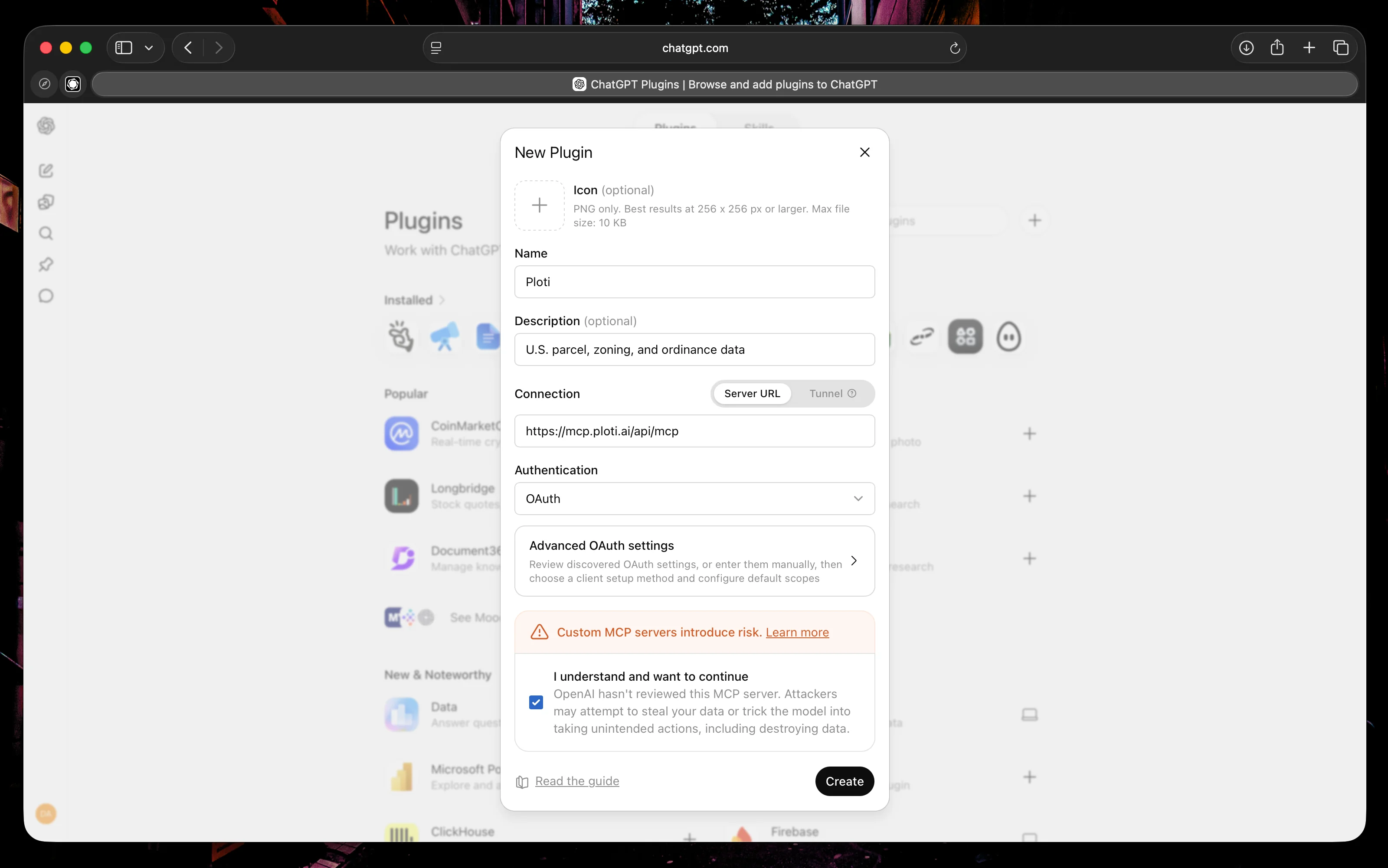
Configure Ploti's server URL and OAuth authentication in the New Plugin form on chatgpt.com, then select Create.
ChatGPT may ask for confirmation before tools that run code or create files.
Review the proposed action and inputs before approving it.