> ## Documentation Index
> Fetch the complete documentation index at: https://terrascout.ai/docs/llms.txt
> Use this file to discover all available pages before exploring further.
# Creating Views
> Save filters you use often
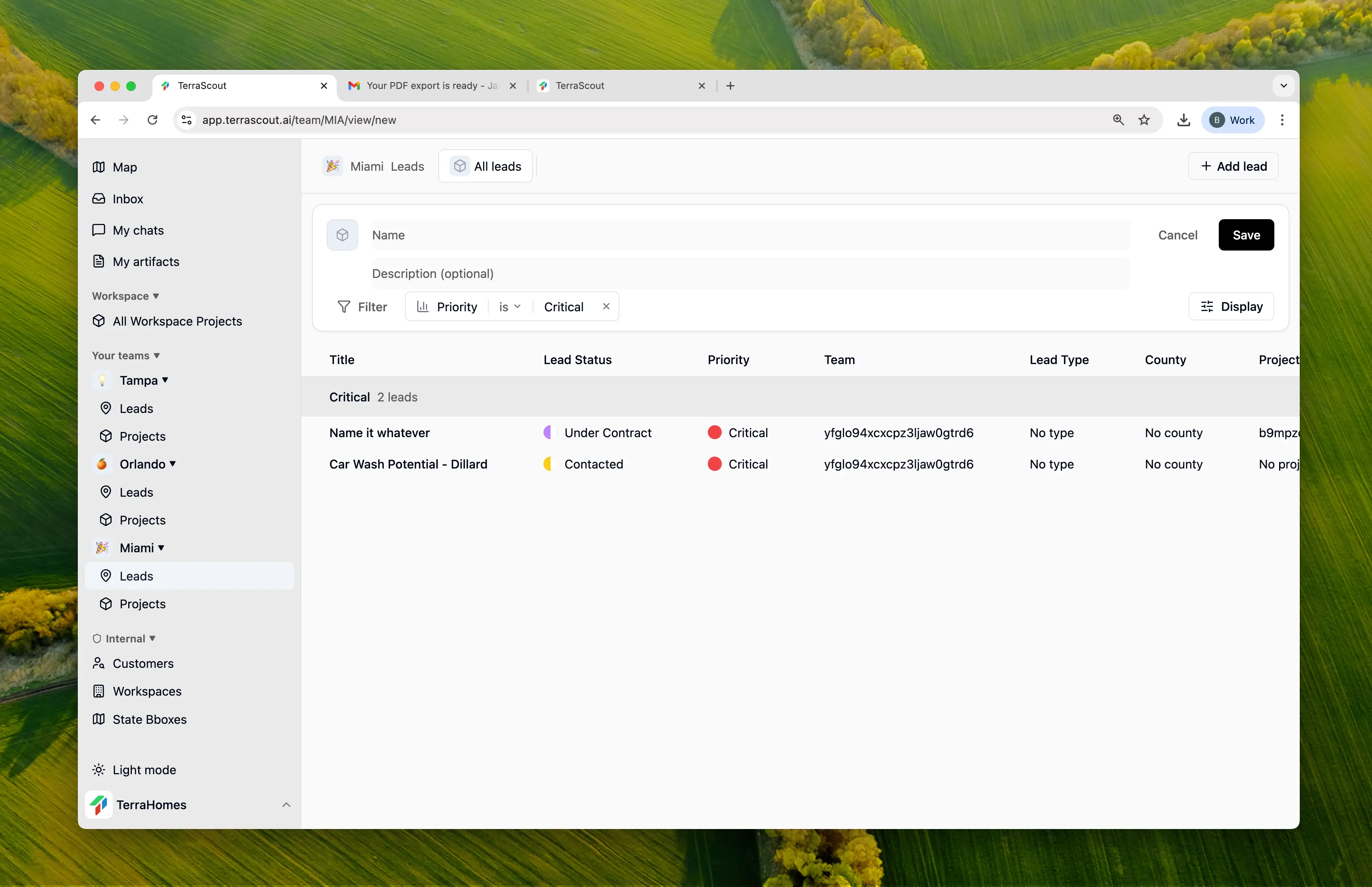 Create views to save filter combinations you use regularly. Your saved views appear as tabs so you can switch between them instantly.
## How to Create a View
1. Filter your leads or projects to show what you want
2. Click **Save View** in the filter bar
3. Give it a name
4. Click **Create View**
That's it. Your view now appears as a tab.
## Naming Your View
Pick a name that tells you what the view shows:
| Good Names | Why It Works |
| -------------------- | ------------------------------ |
| Active High Priority | Clear what status and priority |
| Closing This Month | Obvious time frame |
| Lake County Leads | Specific location |
| My Assigned Deals | Shows ownership |
Avoid generic names like "My View" or "Test"—you won't remember what they're for later.
## Choosing Filters
When creating a view, you can filter by any combination of fields:
* **Status** - Show only leads at a certain stage
* **Priority** - Focus on high-priority items
* **Assigned To** - See just your deals or a teammate's
* **Location** - Filter by state, county, or city
* **Dates** - Expected close date, last activity, etc.
* **Values** - Asking price, estimated value ranges
Start with just one or two filters. You can always add more later if the view shows too much.
## Customizing Appearance
You can personalize your view with:
* **Icon** - Choose an icon or emoji for the tab
* **Color** - Pick a color to make it stand out
This helps you quickly spot the view you need when you have several tabs.
## Tips
"High Priority Florida Leads" is more useful than "Some Leads."
Create views for things you check regularly—daily hot leads, weekly pipeline review.
Begin with fewer filters. Too many filters might show nothing.
Your views are shared with your team—create ones that help everyone.
Create views to save filter combinations you use regularly. Your saved views appear as tabs so you can switch between them instantly.
## How to Create a View
1. Filter your leads or projects to show what you want
2. Click **Save View** in the filter bar
3. Give it a name
4. Click **Create View**
That's it. Your view now appears as a tab.
## Naming Your View
Pick a name that tells you what the view shows:
| Good Names | Why It Works |
| -------------------- | ------------------------------ |
| Active High Priority | Clear what status and priority |
| Closing This Month | Obvious time frame |
| Lake County Leads | Specific location |
| My Assigned Deals | Shows ownership |
Avoid generic names like "My View" or "Test"—you won't remember what they're for later.
## Choosing Filters
When creating a view, you can filter by any combination of fields:
* **Status** - Show only leads at a certain stage
* **Priority** - Focus on high-priority items
* **Assigned To** - See just your deals or a teammate's
* **Location** - Filter by state, county, or city
* **Dates** - Expected close date, last activity, etc.
* **Values** - Asking price, estimated value ranges
Start with just one or two filters. You can always add more later if the view shows too much.
## Customizing Appearance
You can personalize your view with:
* **Icon** - Choose an icon or emoji for the tab
* **Color** - Pick a color to make it stand out
This helps you quickly spot the view you need when you have several tabs.
## Tips
"High Priority Florida Leads" is more useful than "Some Leads."
Create views for things you check regularly—daily hot leads, weekly pipeline review.
Begin with fewer filters. Too many filters might show nothing.
Your views are shared with your team—create ones that help everyone.